← Project overview

Programs and verification

This page shows forward and inverse program examples, a real error caught by an inverse program, an image-replacement test, and five explanations of how inverse programs compute their answers.

Inside a generated world

Forward and inverse programs

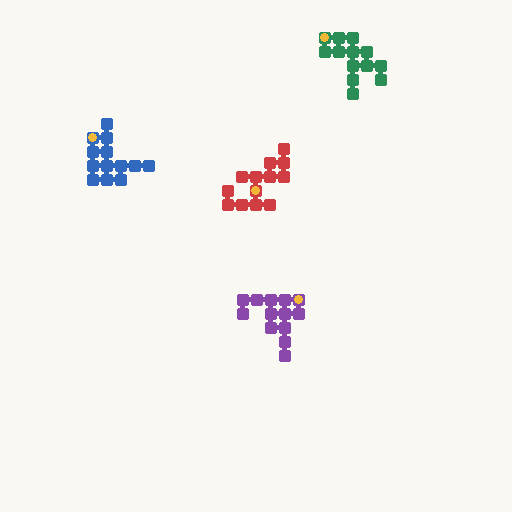
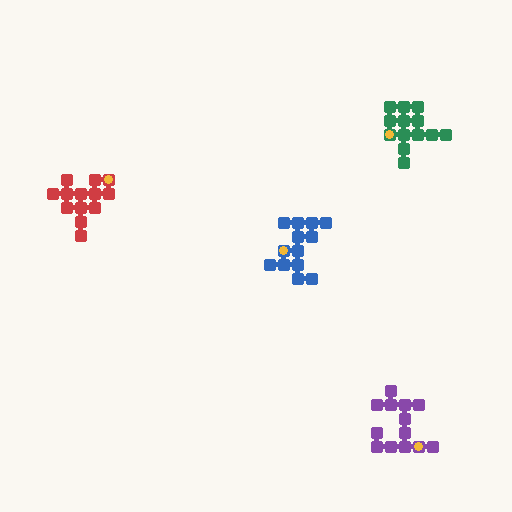
Three selected examples illustrate counting, connectivity, and reasoning about a change to a scene. Switch examples to compare the two programs.

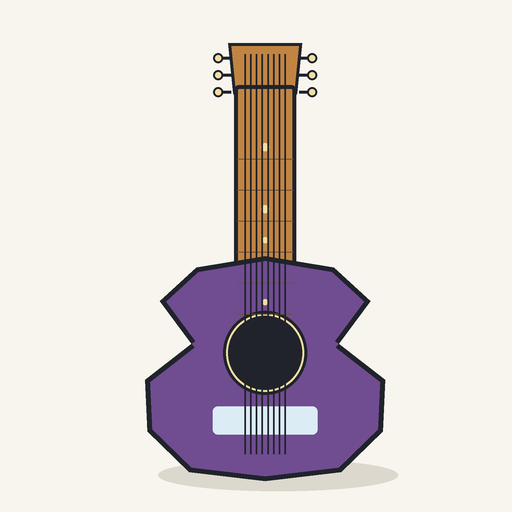
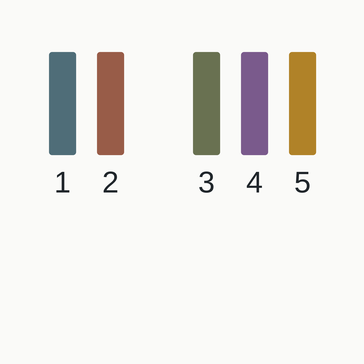
Count the guitar strings
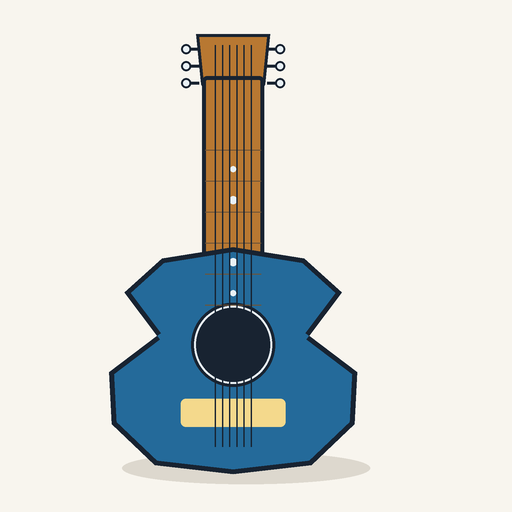
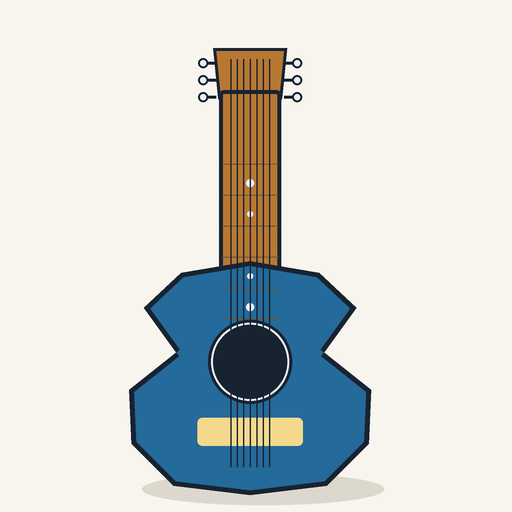
Count the guitar strings: recorded instance 1
Instance 1 · recorded answer 6
Count the guitar strings: recorded instance 2
Instance 2 · recorded answer 7
Count the guitar strings: recorded instance 3
Instance 3 · recorded answer 8
Original question

How many dark strings visibly run from the guitar's headstock, along the neck, and across its body? Count each continuous thin path once. Answer 4, 5, 6, 7, or 8.

Forward program · scene → answer

Read the number of strings specified in the scene.

def analytic_gold(scene: dict) -> str:
    return str(int(scene["string_count"]))
Read full renderer and forward source ↗

Inverse program · image → answer

Locate the bright bridge in the image, identify narrow dark runs across it, and count them. Three adjacent rows must agree.

    # Take a three-row vote. Each qualifying string is a narrow dark run wholly
    # inside the recovered bridge extent; body edges and sound hole lie outside.
    counts = []
    for y in range(y0 - 1, y0 + 2):
        strip = rgb[y, xlo:xhi+1]
        dark = strip.mean(axis=1) < 105
        runs = [(a, b) for a, b in _runs(dark) if 1 <= b-a <= 7 and a > 2 and b < len(dark)-2]
        counts.append(len(runs))
    count = int(np.median(counts))
    if count not in {4, 5, 6, 7, 8} or max(counts) != min(counts):
        raise ValueError(f"ambiguous string runs: {counts}")
    return str(count)
Read full inverse source ↗

These are exact excerpts from generated source files. Helper functions and imports may be omitted; full source links accompany each excerpt. In the string example, the inverse excerpt starts after the bridge has been located. The exported renderer modules also contain the forward answer function, named analytic_gold. The page displays recorded examples and does not run the programs.

A real catch during generation

Why the inverse program matters

The forward program reads the answer from the scene specification, so it cannot notice when the image is drawn wrongly. The inverse program reads the answer from the pixels. When the two disagree, the agent learns that its code is wrong, often in how the image is drawn.

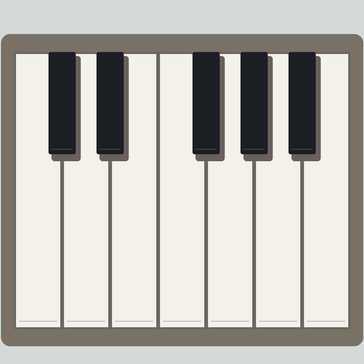
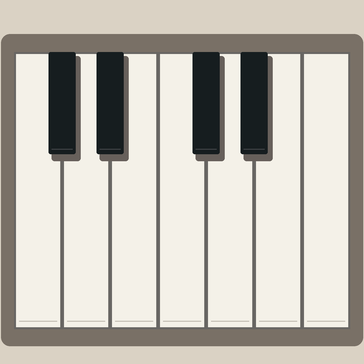
“How many separate raised black keys are visible above the seven white keys?”

  1. Rendered piano image with five black keysRendered image
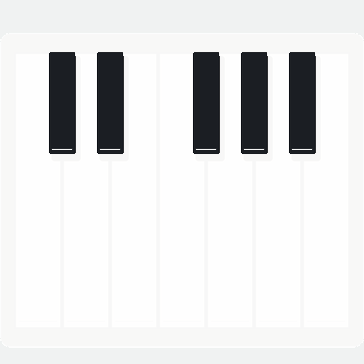
  2. Black pixels kept by the inverse program1Keep black pixels
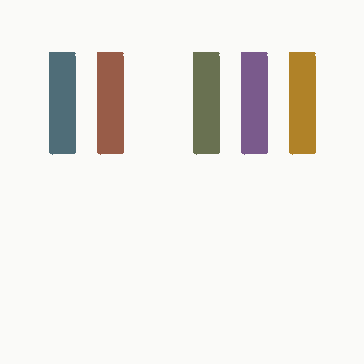
  3. Five connected regions, each in its own color2Group connected regions
  4. Five regions numbered one to five3Count separate keys

Forward 4≠Inverse 5Self-check fails

Agent repairs the renderer

Repaired piano image with four black keysRepaired image

Forward 4=Inverse 4Checks pass

Given a rendered piano octave, the inverse program processes the image deterministically and arrives at the answer 5. This does not match the forward program’s answer of 4, revealing a bug in the renderer. The mismatch is feedback that helps the agent repair the renderer (right). Without the inverse program, this world would have recorded the wrong answer 4 for an image with five black keys. Steps 1–3 are the inverse program’s own outputs on the faulty image.

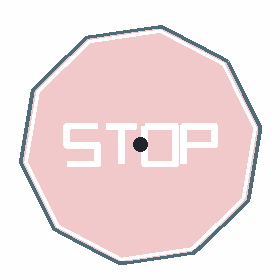
“How many straight sides does the red STOP sign’s outer boundary have?”

  1. STOP sign with ten straight sidesInput image
  2. Saturated red pixels kept by the inverse program1Keep saturated red pixels
  3. Outer boundary of the red region and its center2Get boundary and its center
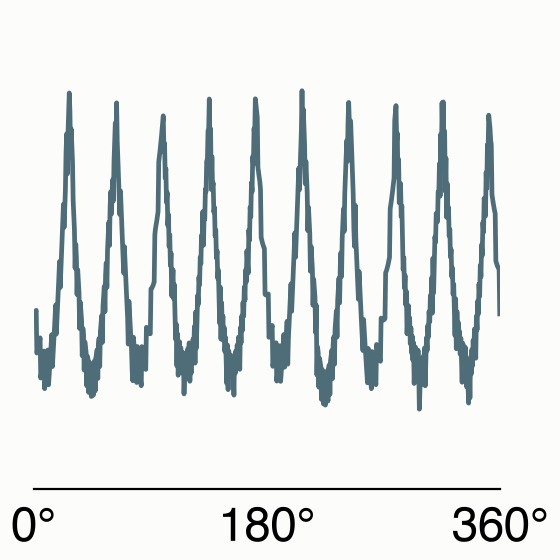
  4. Distance from the center to the boundary at each angle3Boundary distance from center by angle
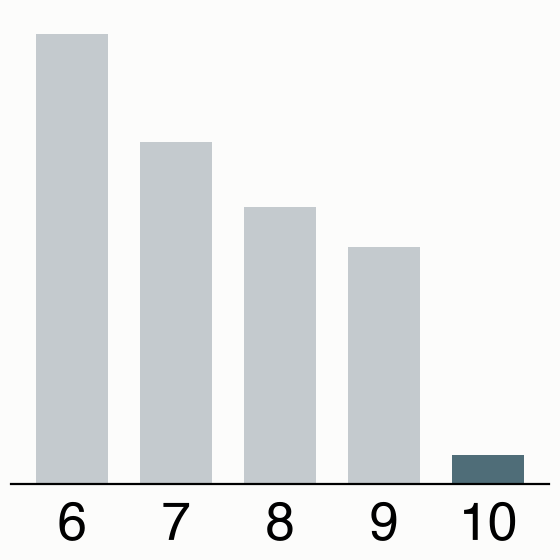
  5. Fit error of regular polygons with 6 to 10 sides; 10 fits best4Fit error of regular 6–10-gons; 10 fits best

Forward 10=Inverse 10Checks pass

The agent writes an inverse program to measure the stop sign’s outline from the image alone and recover its number of sides, matching the forward program’s answer of 10.

What went wrong. The question asks how many separate black keys are visible. The renderer was meant to leave out one of five black keys, but it chose a new random key to leave out at every position, so in this scene it left none out. The scene specification still recorded four black keys, and the forward program answered four.

How the inverse program caught it. The inverse program kept the black pixels, grouped them into connected regions, and counted the separate keys. It found five, disagreed with the forward answer, and the agent’s self-check failed. The agent fixed the renderer so it chooses one key to leave out; on the repaired image both programs answer four.

Why it matters. For 29% of the worlds, the inverse program failed at least once during generation, and the agent fixed its code before submitting. Nearly half of these fixes changed how the image was drawn or sampled.

In a later 200-scene replay, the forward and inverse programs disagreed on some of the new scenes for 1.6% of previously verified worlds; these worlds are removed before evaluation and training. In a controlled test, the checks detected all 300 image replacements that changed the answer.

The world was generated by Sol (high) during profile-steered generation (prior-conflict profile).

Image-replacement test

Image-replacement test

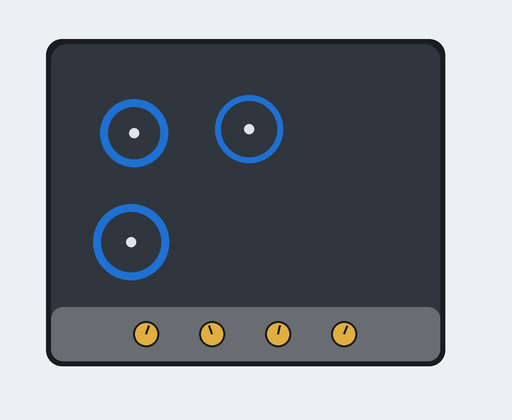
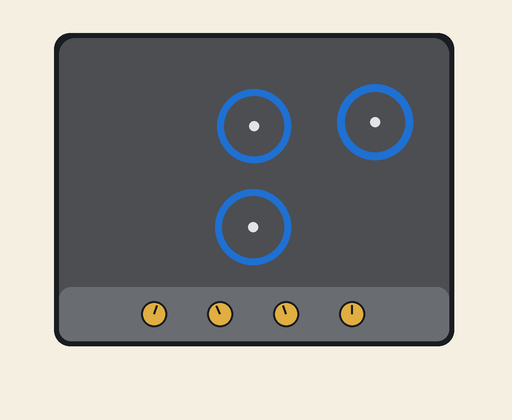
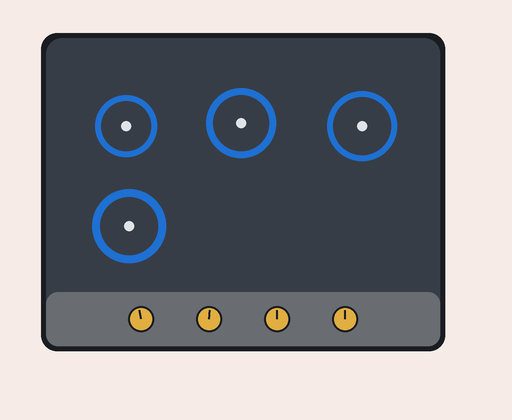
In this test, we keep the scene specification and forward answer fixed, then replace the rendered image. When the replacement supports a different answer, the forward and inverse answers should disagree.

Intended stovetop image with three burners

Intended image

Forward: 3 · Inverse: 3

Answers agree
Different stovetop image with three burners

Different image, same answer

Forward: 3 · Inverse: 3

Answers agree
Substituted stovetop image with four burners

Image with a different answer

Forward: 3 · Inverse: 4

Disagreement detected
Original images from the paper’s image-substitution test. The question concerns the burner count; the intended forward answer remains three in all three conditions.
300 / 300 answer-changing substitutions were detected.

The test covered 100 replay-verified profile-steered worlds, 20 from each coding-agent configuration and covering all nine profiles, with three trials per world. Answers agreed for all 300 answer-preserving substitutions and all 300 original images. Checks that ignore the image passed even on all answer-changing substitutions.

This controlled intervention measures sensitivity to rendering errors. It does not estimate how often such errors occur naturally.

Understanding the inverse programs

Analysis of inverse programs

The paper studies 225 generated worlds, with five worlds from each coding-agent–profile pairing. A fresh analysis-agent session inspected each exported world without running its code.

Common computations

An inverse program usually selects relevant pixels with color or brightness thresholds, groups them into objects or cells, and applies an explicit calculation. For example: measure a colored line, fit a circle through fragments, flood-fill rooms, match a transformed grid, or read arrows and update a counter. Each program is specialized for its world; expected palettes, layouts, and symbols can be fixed in code.

Source inspection and execution checks

All 225 reviewed entry points accepted an image. Source analysis reported no scene-specification access or forward-code imports. A separate execution check in the paper covered the initial 90 worlds: all 270 stored-image answers matched their records.

Common computational steps in the inspected sample
Steps identified by source analysis · 225 worlds
Step Worlds
Detect visible elements 225
Build a grid, graph, order, or grouping 132
Apply a question-specific rule 218
Rank or select an answer 199
Explicitly check ambiguity 210

Steps overlap. The sample was selected to broaden implementation coverage, so these counts do not estimate prevalence across the complete collection. The analysis judged 204 program pairs clearly separate and 21 partly separate; these are model-based source judgments, not runtime isolation tests or new verification outcomes.

1 · Select pixels2 · Recover structure3 · Compute a decision4 · Check the evidence

Image-processing operations. Color or brightness thresholds select relevant pixels. Connected components group touching pixels into objects. Coordinates, regions, or grid cells then become inputs to measurement, matching, traversal, or state updates.

These are specialized programs: palettes, expected layouts, and symbol templates can be fixed in code. Conditions often check geometry or reject ambiguous evidence. The offline verifier is a separate system that tests the world; the inverse program supplies the image-derived decision.

Five programs, step by step

Selected for clear explanations and varied computations, not to estimate category frequencies. Images and linked source are original; pseudocode is explanatory and is not executed on this page.

01

Measure a colored curve

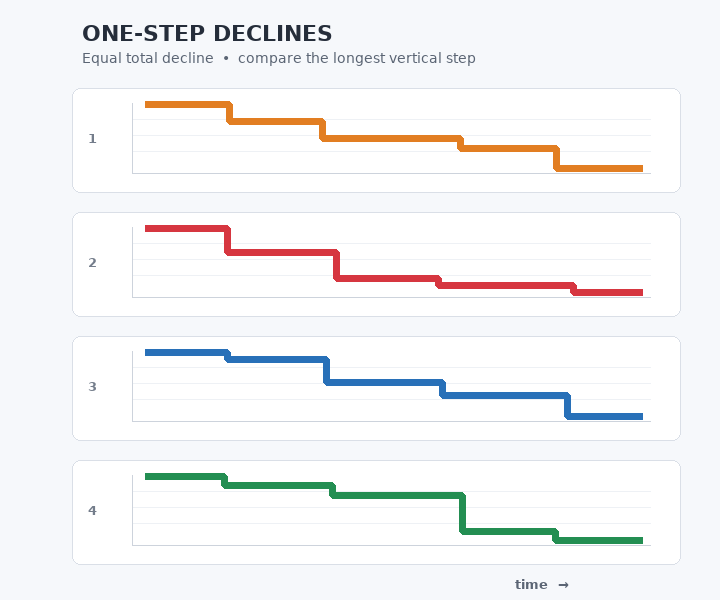
Separate the four colors, then measure the tallest vertical segment.

All four colored step curves have the same total vertical decline. Which curve has the largest single vertical drop between adjacent horizontal plateaus? Answer red, blue, green, or orange.
Original instance · Try this question ↗
Question and recorded answer

All four colored step curves have the same total vertical decline. Which curve has the largest single vertical drop between adjacent horizontal plateaus? Answer red, blue, green, or orange.

Recorded answer: green

Color masks → column spans → largest drop

For each curve color, the program selects nearby RGB values. In every occupied column it measures the distance between the first and last selected pixel, then takes the largest span.

Simplified pseudocode · helpers summarize pixel processing

for color in curve_colors:
    mask = pixels_close_to(color)
    score[color] = largest_column_span(mask)
return largest_score_color(score)

Evidence checks. Rejects missing curves and a winning margin smaller than two pixels.

Read the complete original Python program ↗
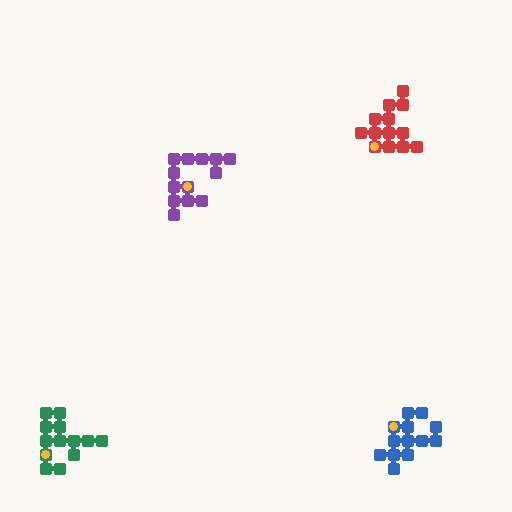
02

Fit a circle through fragments

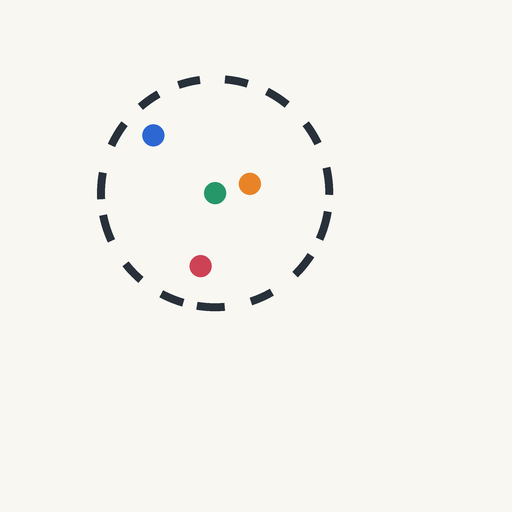
Fit one circle through the arcs, then find the dot nearest its center.

All four dots are candidates. The disconnected dark arcs are pieces of one circle. Which colored dot is at that circle's center? Answer red, blue, green, or orange.
Original instance · Try this question ↗
Question and recorded answer

All four dots are candidates. The disconnected dark arcs are pieces of one circle. Which colored dot is at that circle's center? Answer red, blue, green, or orange.

Recorded answer: green

Dark pixels → least-squares circle → nearest dot

The program selects dark contour pixels and fits x² + y² = 2cx·x + 2cy·y + c by least squares. It estimates each colored dot’s center by averaging its pixel coordinates.

Simplified pseudocode · helpers summarize pixel processing

arcs = select_dark_pixels(image)
center = fit_circle_least_squares(arcs)
dots = measure_colored_dot_centers(image)
return nearest_dot(dots, center)

Evidence checks. Checks fit error, coverage around the circle, marker sizes, and separation between the nearest two dots.

Read the complete original Python program ↗
03

Find a shared room

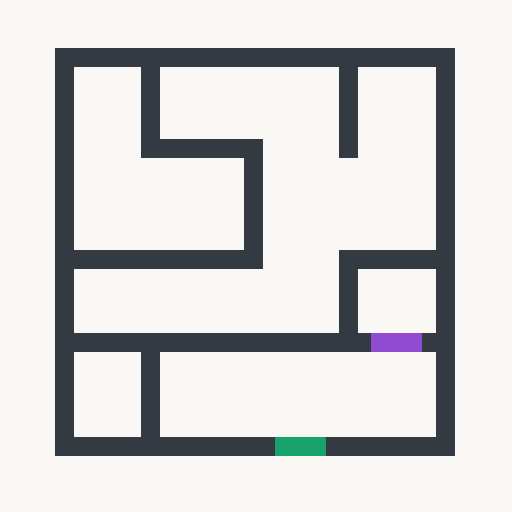
Paint each room a temporary color. Do both gates touch the same room?

Do the green and purple gates border at least one same enclosed white chamber? A chamber is a side-connected white region completely surrounded by the dark wall network; touching only at a corner does not connect regions. Answer yes or no.
Original instance · Try this question ↗
Question and recorded answer

Do the green and purple gates border at least one same enclosed white chamber? A chamber is a side-connected white region completely surrounded by the dark wall network; touching only at a corner does not connect regions. Answer yes or no.

Recorded answer: yes

White pixels → connected rooms → shared neighbor

A flood fill groups white pixels connected through horizontal or vertical neighbors. Regions touching the image boundary are exterior space. The program samples beside the long edges of both gates and compares their enclosed-room labels. It labels regions at a conservative four-pixel scale.

Simplified pseudocode · helpers summarize pixel processing

rooms = label_connected_white_regions(image)
rooms = remove_exterior_regions(rooms)
a = rooms_beside(green_gate)
b = rooms_beside(purple_gate)
return bool(a & b)

Evidence checks. Checks image dimensions and gate geometry; rejects gates with no resolved enclosed neighbor.

Read the complete original Python program ↗
04

Transform a grid and match a glyph

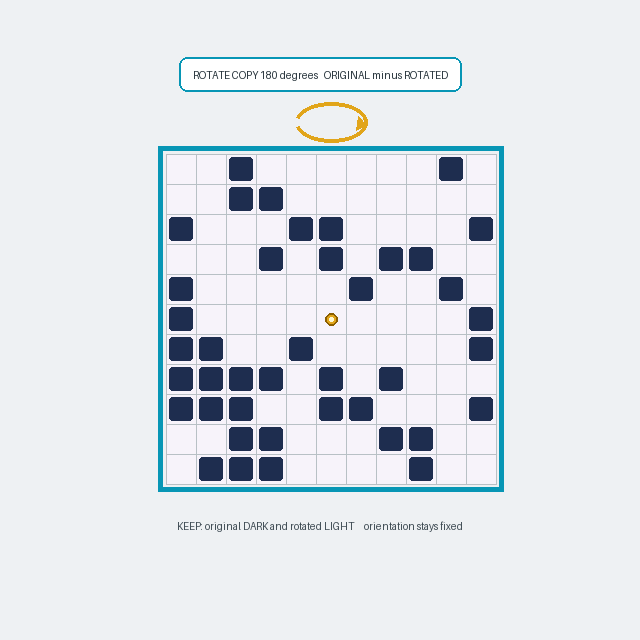
Read the squares, rotate a copy, subtract, and recognize what remains.

Inside the cyan frame, rotate a copy of the 11-by-11 tile mosaic by half a turn (180 degrees) about the gold center dot. Keep a result cell dark only when that cell is dark in the original and light in the rotated copy. Keep the original orientation. Which glyph appears: fork, hook, stair, or rake?
Original instance · Try this question ↗
Question and recorded answer

Inside the cyan frame, rotate a copy of the 11-by-11 tile mosaic by half a turn (180 degrees) about the gold center dot. Keep a result cell dark only when that cell is dark in the original and light in the rotated copy. Keep the original orientation. Which glyph appears: fork, hook, stair, or rake?

Recorded answer: stair

Cell brightness → rotation and subtraction → template match

The cyan frame locates an 11 × 11 grid. Brightness inside each cell determines whether it is dark. The program removes cells that are also dark in a half-turned copy, then compares the remaining set with four stored glyph patterns across possible placements.

Simplified pseudocode · helpers summarize pixel processing

dark = read_dark_grid_cells(image)
rotated = {(10-r, 10-c) for r, c in dark}
remaining = dark - rotated
return closest_glyph_template(remaining)

Evidence checks. Rejects ambiguous cells, implausible counts, excessive template mismatch, and close matches.

Read the complete original Python program ↗
05

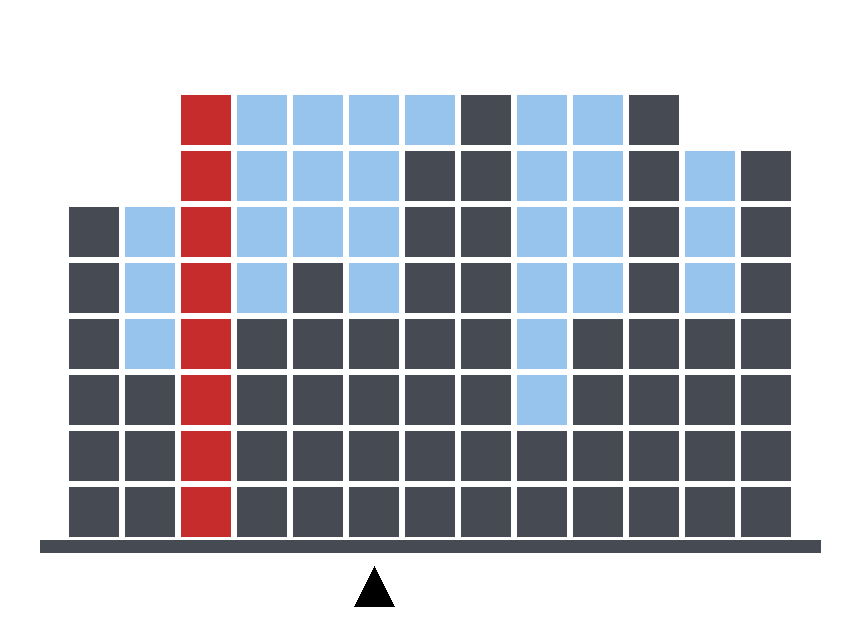
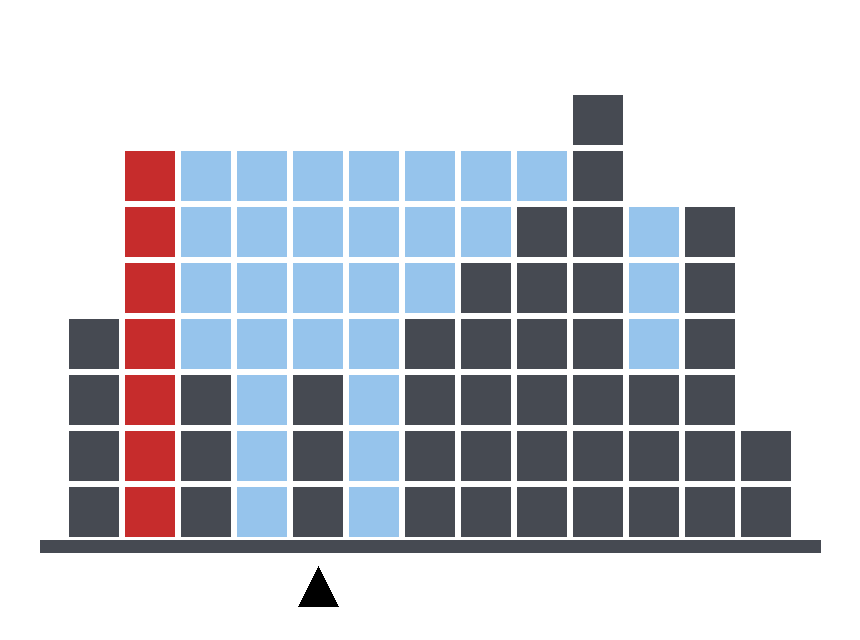
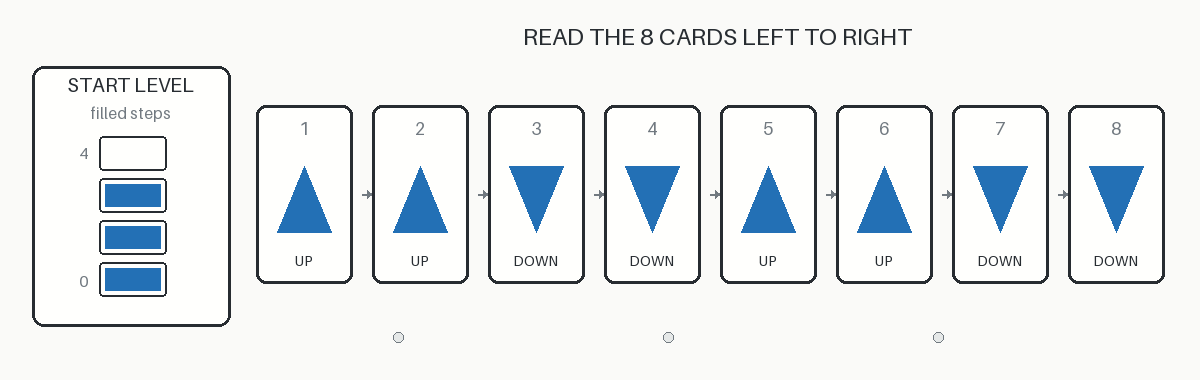
Read arrows and update a counter

Read the starting level and arrows, then keep the counter between zero and four.

The gauge starts with the shown number of filled steps. Read the eight triangle cards from left to right: an up-pointing triangle adds one step unless the gauge is already full, and a down-pointing triangle removes one step unless it is already empty. What level remains? Answer 0, 1, 2, 3, or 4.
Original instance · Try this question ↗
Question and recorded answer

The gauge starts with the shown number of filled steps. Read the eight triangle cards from left to right: an up-pointing triangle adds one step unless the gauge is already full, and a down-pointing triangle removes one step unless it is already empty. What level remains? Answer 0, 1, 2, 3, or 4.

Recorded answer: 2

Colored objects → ordered commands → bounded counter

Connected colored pixels form objects. Proportions and filled area distinguish gauge blocks from triangles. A triangle’s center of mass relative to its bounding box determines its direction. The program orders commands from left to right and updates the level.

Simplified pseudocode · helpers summarize pixel processing

level = count_gauge_blocks(image)
for op in read_arrows_left_to_right(image):
    if op == "up":
        level = min(4, level + 1)
    else:
        level = max(0, level - 1)
return level

Evidence checks. Requires eight recognizable commands with enough horizontal separation and at most four starting blocks.

Read the complete original Python program ↗